Inbox triage at 8am
Set a time that suits you. When you sit down, the new mail is already sorted and the easy replies drafted, instead of 60 unread staring back.
Runs on a Mac you own. No server.
Alfos has no AI of its own and no API key. The AI coding agent you already run drives it to do real work across your Mail, Calendar, Reminders, Notes and Files, on demand or on a schedule. Nothing irreversible happens until you approve it, and everything is logged.
Your data stays on your Mac. Alfos sends nothing home: the only thing that ever leaves is the prompts your own AI provider already sees.
Works with the AI coding agent you already run: Claude Code, Codex, Gemini CLI, Claude Desktop, Grok Build, and more. Bring the one you already pay for. Alfos never charges for usage.
I built it because I wanted it on my own Mac, and didn't trust anything else to touch my inbox.
Why Alfos
You want your agent running real automations on a schedule. You do not want to rent and babysit a VPS, hand-roll cron and scripts, or do DevOps just to keep it alive. Alfos is the layer that makes that go away.
It runs on a Mac you own. Leave a cheap Mac mini on in the corner and your agent has a home that is always there. No VPS to rent, no Linux box to patch, no monthly bill, no DevOps. For reliable always-on it should be a Mac you keep running, not your laptop while you work, and that is the point: a Mac you own beats a server you rent.
Alfos is agnostic to the AI coding agent you already run: Claude Code, Codex, Gemini CLI, Claude Desktop, Grok Build, and more. No lock-in. Switch agents whenever you like and Alfos stays your local execution layer. It has no AI of its own and holds no API key.
Every irreversible action waits for your approval, and everything it does goes into a log you can read back. The agent can line an action up or cancel it, but it can never approve its own. That is what lets you walk away and still trust an agent on your real apps and data.
No cron, no launchd, no scripts, no glue code. You say what you want in plain words and it runs, on demand or on a schedule. It saves you a day of setup and the maintenance that follows it.
What it does
Ask in plain words, or set a time and forget about it. Nothing to configure. A few things people actually use it for:
Set a time that suits you. When you sit down, the new mail is already sorted and the easy replies drafted, instead of 60 unread staring back.
It pulls a meeting out of an email and into your calendar, sets the follow-up, adds the reminder. The small admin you keep putting off.
Replies get written, threads get filed, junk gets archived. Nothing irreversible happens, and nothing is sent or deleted, until you have said yes.
See it work
On a schedule or on demand, the rule is the same. It reads, drafts, captures and notifies you on its own. Anything irreversible stops in a queue and waits for you. 60 tools across Mail, Calendar, Reminders, Notes, Messages, Contacts and Finder, every one of them logged.
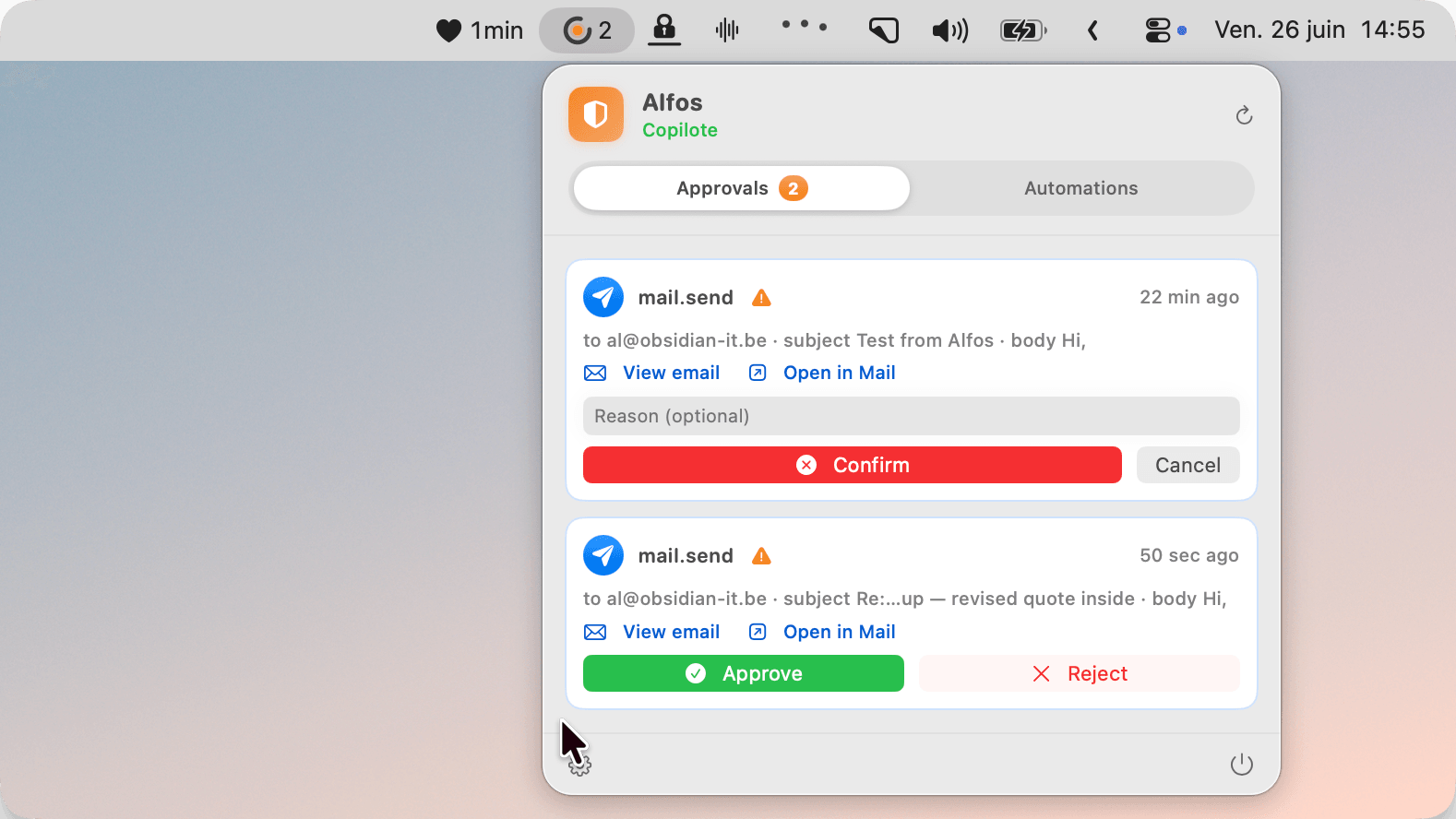
A real send waits in the queue. The agent lined it up; only your tap runs it.
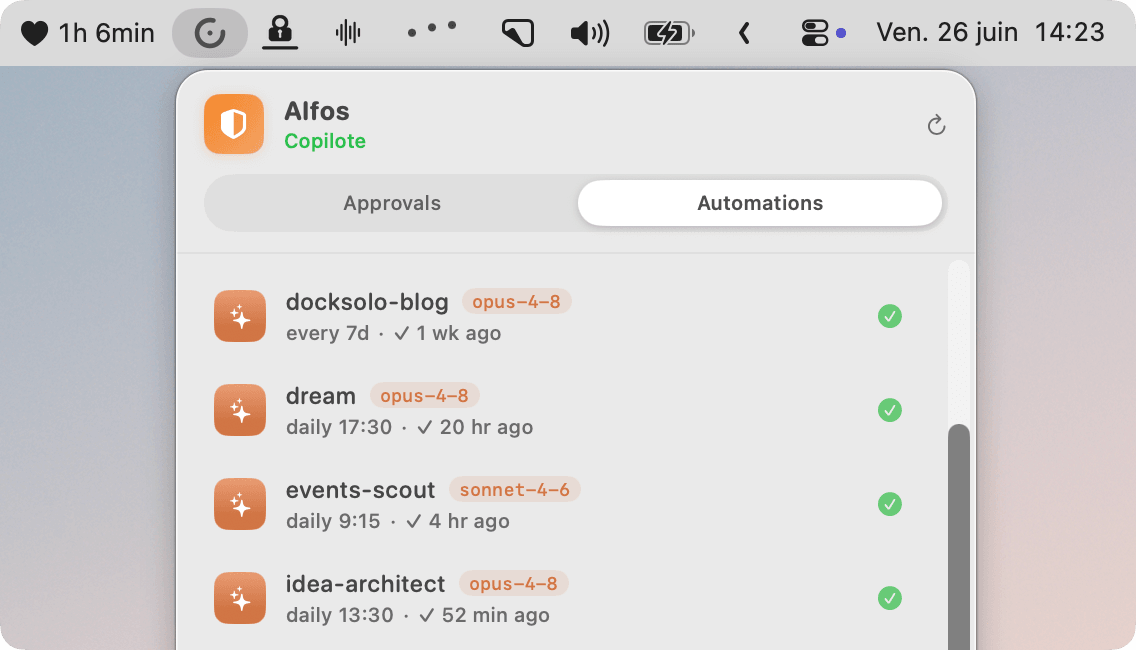
Recurring agents on a schedule, running on your Mac even when the app is closed. They act on their own; anything destructive still queues for your approval.
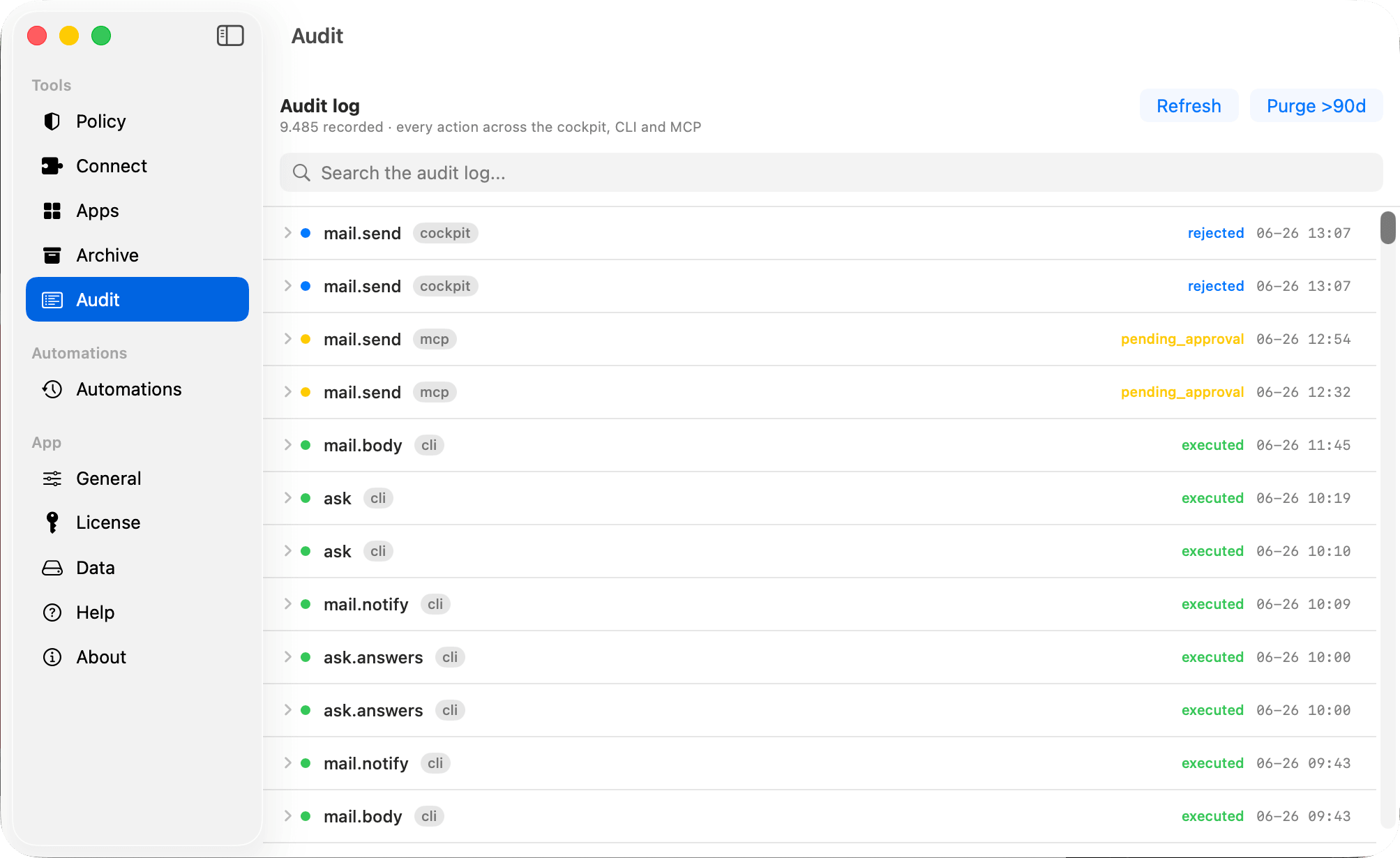
Every action across the cockpit, the CLI and your agent: executed, pending and rejected, all searchable and written down.
You set how far it can go. Three postures, one rule that never bends: the agent can line up or cancel an action, but it can never approve its own.
| Autonomy mode | Read | Create | Destructive |
|---|---|---|---|
| Panic | runs | asks you | asks you |
| Copilote default | runs | runs | asks you |
| YOLO | runs | runs | runslogged |
A deny rule you set wins in every mode, even YOLO. Flip to Panic and everything that touches the world stops at once.
Where the boundary sits
Alfos is the audited interface to your apps, not a sandbox around your agent. Every action that runs through Alfos is gated and logged, so even a prompt-injected agent cannot send or delete behind your back. Give the agent Alfos as its only way to reach your Mac and every irreversible step passes through you. Hand it a raw shell as well, and that part is on your AI CLI's own permissions, not Alfos.
Why not just...
A Linux box to rent, patch and babysit, plus cron and scripts to hand-roll, plus a monthly bill, just to keep an agent alive. Alfos runs on a Mac you already own and skips all of it.
Works fine, until one loop misfires at 3am and deletes 400 emails with no log and no undo. Route that same work through Alfos instead and every irreversible step is gated behind your approval and written down.
Superhuman, Shortwave and the rest read your whole mailbox on their servers. Alfos has no server to read it on. The work happens on your Mac, through the AI assistant you already run.
Before you start
Alfos is the local layer, not the brain. It connects to the AI agent you already run and gives it safe hands on your Mac. Setup is about two minutes.
Your laptop is fine for on-demand runs. For always-on automations, leave a cheap Mac mini on in the corner.
Claude Code, Codex, Gemini CLI, Claude Desktop or Grok Build. The common ones connect in one click, any other with a copy-paste snippet. Alfos brings no AI of its own and holds no API key.
Grant access to the apps it will touch, pick an autonomy posture, connect your agent. Then it is yours.
Your data and your agent run on your Mac. Alfos itself sends nothing home: the only network calls it makes are checking your license and updating the app. The AI CLI you connect still sends its prompts to its own provider, and that provider bills you for its own usage, exactly as it does today. Alfos never charges for usage.
Pricing
Free already reads, captures, tidies your inbox and runs up to 3 automations on your Mac. Pay once to let it act on your behalf at full scale. No subscription, no renewal. Every irreversible action is approval-gated and logged on both tiers.
No card, no account.
Reads, captures and tidies for you, with up to 3 automations included. Nothing irreversible, ever.
One payment. Lifetime, no subscription, no renewal.
Everything in Free, plus the agent acting on your behalf at full scale. You buy and activate Pro from inside the app, after you install. Every irreversible step still approval-gated and logged.
Bring your own AI agent. Alfos never charges for usage.
FAQ
You need one AI coding agent installed: Claude Code, Codex, Gemini CLI, Claude Desktop or Grok Build. If you already run one, connecting Alfos is a single click. If you have never used one, that is the piece to set up first. Alfos itself is a normal menu-bar app, and you tell it what to do in plain words.
No. Your mail, calendar, notes and files stay on your Mac, and the work runs locally. Alfos only ever phones home to check your license and update the app. The one thing that leaves your Mac is the prompts your own AI agent sends to its provider, exactly as it already does today.
On its own it can read, capture (add a reminder, an event, a note) and tidy (archive, flag, draft a reply). Anything irreversible, like sending or deleting an email, editing your calendar or sending a message, waits for your explicit approval. The agent can queue an action or cancel one, but it can never approve its own, in any mode.
No. Free reads, captures and tidies for real, and runs up to 3 automations on a schedule. What it does not do on Free is act at full scale: send, reply, delete and edit. That is what Pro unlocks.
Lifetime means you pay 29 € once and Pro is yours for good, with no subscription and no renewal. Founder is the early-adopter price for the people who back Alfos now, and it will rise as the product grows.
Claude Code, Codex, Gemini CLI, Claude Desktop and Grok Build connect in one click. Any other agent that speaks MCP connects with a copy-paste snippet. Alfos has no AI of its own and holds no API key, so you keep whichever agent you already pay for and can switch any time.
Download Alfos free and let it start reading and triaging today. Unlock Pro when you want it sending, replying and editing for you, and running more automations, 29€ once, yours for good.
Download for macOSFree to start. A small menu-bar app for macOS 14 and later. Updates itself automatically.